The Gameplay Ability System (GAS) is a robust, highly extensible gameplay framework commonly used to build complete combat logic for RPGs, MOBAs, and similar games. With GAS you can quickly create active and passive abilities, various buff effects, damage calculations, and complex player combat state logic.
GAS attempts to extract mechanics into general game design patterns and provides a framework for solving common gameplay implementation problems, while keeping the specifics flexible enough to vary by project.
C++ projects with developers who have solid C++ experience
Online games using a Dedicated Server (a pure game-logic server; the alternative is a Listen Server where one player acts as host, which is prone to “host advantage”)
Projects with large, complex ability design requirements
Main advantages of GAS
Network Replication: You don’t have to worry about attributes or debuff effects not being properly applied or replicated. GAS handles the internal logic for you.
Modularity: Adding or changing game mechanics is usually as simple as implementing and granting a new ability. By decomposing gameplay features into separate assets, the ability system can provide a common communication layer across entirely different game objects or mechanics. For example, Health can be split into its own AttributeSet and interacted with via GameplayEffects from various systems.
Fast Iteration: GAS makes it easy to change individual game rules without modifying the whole system. The data sources used for calculations can be swapped out easily, and action effects can be modified directly from the corresponding GameplayEffect.
Why I’m learning GAS
Writing boilerplate code is error-prone and time-consuming, especially for multiplayer games. For instance, you don’t want to spend a lot of time making sure your Health value replicates correctly, or duplicating that same code when you later decide to add an Energy attribute with the same behavior.
GAS solves these problems by providing a foundation that implements common gameplay functionality as much as possible while remaining mechanics-neutral. Rather than forcing concepts like Health, Ammo, Melee Attack, or Poison Debuff on you, GAS provides tools to define, replicate, and use Attributes, Abilities, and Effects, which you can then specialize to meet the needs of a given gameplay mechanic.
For me personally: the project at work requires networked game services. So you’ll see some italicized notes scattered through my notes — those are remarks about my own project and can be ignored.
GAS Components
ASC: Who can use abilities?
The Ability System Component (ASC) is the foundational component of the entire GAS framework. The ASC is essentially a UActorComponent that handles all interaction logic under the framework, including using GameplayAbilities, holding AttributeSets, and processing GameplayEffects. Every Actor that needs to participate in GAS must have an ASC. (In other words, any character that has ability interactions is an ASC.)
The ASC is a character component responsible for interfacing with GA, GE, and AS.
It’s generally only placed on the Character or PlayerState.
The Actor that owns the ASC is called the OwnerActor; the Actor the ASC actually operates on is called the AvatarActor.
GA: How does the ability’s logic work?
A Gameplay Ability (GA) represents what an object (Actor) in the game can do — its behaviors or skills. It represents any skill or action a character can perform. An Ability can be a normal attack or a cast-time skill, a knockdown reaction, using an item, interacting with an object, or even actions like jumping and flying. Abilities can be granted to or removed from an object’s ASC, and an object can have multiple GameplayAbilities active simultaneously.
Basic movement input and UI interactions cannot — or should not — be implemented as GAs.
Implemented by inheriting from GameplayAbility in Blueprint.
GA Execution Flow
graph TD
A[TryActivateAbility] --> B{CanActivateAbility}
B -->|Yes| C[ActivateAbility]
B -->|No| D[EndAbility]
C --> E[Start AbilityTask]
E -->|Some Time Later| F[CommitAbility]
F -->|Can't Afford| D
F --> G[Start AbilityTask]
G -->|Some Time Later| H[Apply GameplayEffects]
G --> I[Start AbilityTask]
I -->|Some Time Later| J[Apply GameplayEffects]
I -->|Some Time Later| K[End Ability]
D --> L[OnEndAbility]
K --> L
L --> M[Cleanup]
TryActivateAbility: First checks whether the ability can be executed.
ActivateAbility: Executes the ability (plays the ability animation, e.g., fires a flame).
CommitAbility: The ability has successfully fired — deduct the cost (e.g., mana).
Start AbilityTask * 2: Ability is executing… ability execution ends. Then apply the corresponding effects.
ActivateAbility and EndAbility work similarly to BeginPlay and EndPlay — they are called in Blueprint.
Blueprint Settings
Key Option Explanations
Common Blueprint Nodes
EndAbility — ends this ability
Advanced Settings
Replication Policy: Determines whether this Ability’s activation and execution information is propagated over the network. Common options:
Not Replicated: Executes locally only, not synced to other clients/server.
Replicated: Synced between server and clients.
Instancing Policy: Determines how the Ability is instantiated.
Non-Instanced: All activators share the same Ability object, suitable for stateless logic.
Instanced Per Actor: Each owner has its own instance, suitable for stateful logic.
Instanced Per Execution: A new instance is created on every activation, suitable for complex abilities that need isolated state.
Server Respects Remote Ability Cancellation: When checked, the server will honor client requests to cancel the Ability. Useful for scenarios where the client actively cancels an ability.
Retrigger Instanced Ability: Allows the Ability to be activated again while it is already active (re-instantiates it), suitable for stackable or repeatable abilities.
Net Execution Policy: Determines which side activates and executes the Ability.
Local Predicted: Client predicts execution, server validates.
Local Only: Executes locally only.
Server Only: Executes on server only.
Server Initiated: Server initiates, client can participate.
Net Security Policy: Controls the security level of the Ability to prevent abuse by malicious clients.
Client Or Server: Both client and server can activate.
Server Only Execution: Only the server can activate.
Server Only Execution and Data: Only the server can activate, and data exists only on the server.
What a GA should do
In general, a GA should:
Set the GA’s Tags, cooldown, cost, and other properties.
Retrieve necessary information, primarily via Get Actor Info. If the GA is called via an Event (using the Activate Ability From Event node as input), additional data can be retrieved via Gameplay Event Data.
Implement logic: play animations, apply GEs, apply impulses, etc.
Never forget to call EndAbility.
Calling a GA
GA calls fall into two categories: active calls (player-triggered abilities) and passive calls (reactions such as getting hit). Each approach is described below.
Active Calls
In Blueprint, the two main calling methods are by Class and by Tag.
By Class can only activate one GA at a time; by Tag can activate any number of GAs and works together with a tag container.
If you use the EnhancedInputAction plugin to manage input, note that in some configurations the trigger fires every frame.
As long as you can get hold of the ASC, you can call a GA from anywhere — for example from a Behavior Tree Task Blueprint, or even from within another GA Blueprint.
Passive Calls
A Trigger can be understood as a Tag. When the ASC receives a Trigger, it will automatically call all GAs that have that Trigger registered.
The Trigger Tag is set in the GA’s Details panel.
There are three ways a Trigger can fire:
Gameplay Event: When the Owner receives a Gameplay Event with the corresponding Tag (not a GameplayEffect GE!), the GA is called once. At this point the Owner does not gain the corresponding Tag.
Owner Tag Added: The GA is called once when the Owner receives the corresponding Tag.
Owner Tag Present: The GA is called while the Owner has the Tag, and is removed when the Tag is removed.
The first approach is most commonly used, paired with the SendGameplayEventToActor node, as shown below. (This screenshot was taken a while ago — it’s recommended that Tags start with “Event”.)
An example of a hit reaction: sending an Event with a “Hit” Tag to the Actor detected by the collision check.
The advantage of calling via Gameplay Event is that you can pass data (a Payload) — this is an alternative to Get Actor Info for passing information.
When using this approach you should remove the ActivateAbility node and use the ActivateAbilityFromEvent event instead. (Don’t use the Override Function approach in the top-left corner — right-click on empty space and search for it instead.)
GE: What attributes does the ability change?
A Gameplay Effect (GE) is the mechanism by which an Ability affects itself or others. GEs are commonly understood as buffs in our game. For example, a buff/debuff that modifies attributes. But GEs in GAS are even broader than that: damage calculation when an ability fires, applying special control effects or super armor (modifying GameplayTags) — all of this is done through GEs.
A GE is simply a configurable data table — you cannot add logic to it. Developers create a Blueprint derived from UGameplayEffect and configure the desired effect from there.
GEs are pure Blueprint.
GT: What conditions govern the ability?
FGameplayTags are hierarchical labels in the form Parent.Child.GrandChild. They are registered through the GameplayTagManager. They replace the old Bool or Enum pattern and provide a more efficient way to mark an object’s behavior or state during gameplay design (for example, a burn effect: once the GE completes, the corresponding tag can be removed). I think of it as a JSON attached to an Actor.
The hierarchy of Tags also needs to be carefully designed — retrofitting it later is costly.
Attribute Set
Responsible for defining and holding attributes, and managing their changes, including network synchronization. Must be added as a member variable in the Actor and registered with the ASC (in C++). A single ASC can hold one or more (different) AttributeSets, so characters can share a single large Attribute Set, or each character can add AttributeSets as needed. You can handle related logic before an attribute changes (PreAttributeChange) and after (PostGameplayEffectExecute), and bind to attribute changes via delegates.
Player State
PlayerState is a special Actor class in Unreal Engine used to store player-related information. In a multiplayer game, PlayerState is automatically replicated between the server and all clients, making it ideal for storing player data that needs to sync across the network.
In the GAS system, the ASC can optionally be mounted on the PlayerState instead of the Character. The benefits of doing so are:
Persistence: When a character dies or respawns, the PlayerState continues to exist — ability and attribute data are not lost.
UI Access: UI can access the player’s abilities and attributes more conveniently without depending on a specific Character instance.
Observer Mode: Even when a player is in observer mode (with no Character), the ability system state is maintained.
The common approach is:
Player-controlled characters: ASC lives on the PlayerState.
AI-controlled characters: ASC lives directly on the Character.
Component Summary
Visual: visual effects for abilities? GameplayCue Async: long-duration ability actions? (async) GameplayTask Send: ability message events? GameplayEvent These last two are actually the same thing.
Other Background Concepts
RPC
RPC = Remote Procedure Call.
In UE networking, this means:
You call a function on the client, but the implementation executes on the server (Server RPC).
Or you call a function on the server, but it executes on some/all clients (Client/NetMulticast RPC).
At its core, an RPC:
Packs the “function name + arguments” into a network message (via the actor channel)
Sends it to the remote end
The remote end receives it and calls the corresponding _Implementation function
Two conditions must be met for an RPC to succeed:
The object you’re calling on has a network channel / is sendable (typically an Actor or something mounted on an Actor)
The engine knows which connection to use to send this network message (server or a specific client)
“Routing”
You can think of “routing” as answering: which network connection does this RPC message get sent through? Who receives it? How does the engine know? In UE, RPCs are ultimately sent via an Actor’s network connection/channel (actor channel + owning connection). A type like UTCGGameplayAbility is a UObject (not an Actor), so it has no network connection of its own — its RPCs need to “borrow a lane.”
Whose lane does it borrow? The answer: it borrows from the Actor (or traceable Actor chain) it belongs to — typically the ASC’s OwnerActor / AvatarActor / PlayerController chain.
The most typical ownership chain (for a client player) should be: PlayerController (has the owning network connection) 👆owns Pawn/Character 👆Pawn has ASC (or ASC’s OwnerActor is Pawn/PlayerState) 👆Ability retrieves ActorInfo from ASC
So when you call a Server RPC inside an Ability (UObject), UE will walk the Ability’s ActorInfo to find: which Actor has an owning connection (usually the PlayerController or a Pawn it owns), then send the RPC to the server through that connection.
Basic Usage
Enable the Plugin
In a C++ project, install the Gameplay Ability plugin.
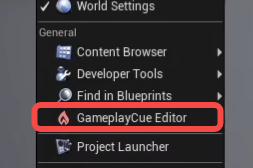
If the GameplayCue Editor appears under the Tools menu, the plugin was enabled successfully.
You should now see Gameplay-related items on the new Blueprint page.
Using Rider to Quickly Add Unreal Classes
Create a Character from here — this quickly gives you the necessary header files.
ASC Component Architecture
classDiagram
class ACharacter
class ARPGCharacterBase {
+AbilitySystemComponent
}
class BP_Character {
+Common Logic
}
class BP_PlayerCharacter {
-Assemble Camera and other components
-Input binding
}
class BP_NPCCharacter
ACharacter <|-- ARPGCharacterBase
ARPGCharacterBase <|-- BP_Character
BP_Character <|-- BP_PlayerCharacter
BP_Character <|-- BP_NPCCharacter
You need to create a C++ class that inherits from ACharacter yourself.
After that, if you want to use Blueprints, simply derive from this custom C++ Character class.
Add GameplayAbilities, GameplayTags, and GameplayTasks to the Build file.
Add an AbilitySystemComponent in the header file — mounting the AbilitySystemComponent (ASC) directly on the character is compatible with multiplayer games.
Granting GAs in C++: We can store all our abilities in a Data Asset (DA) table, then read data from the DA table and use AbilitySystemComponent->GiveAbility to grant them to the ASC.
1 2 3 4 5 6 7 8 9 10 11 12 13
// Add abilities for(FTCGAblityInfo& Info : AllAbilitiesInfo){ if (Info.AbilityClass == nullptr) continue; CharacterAbilities.Add(Info.AbilityClass); }
This way you can see the Ability options in child classes that inherit from the Base Character.
There are many ways to grant a GA — for example, calling the Give Ability node in a Blueprint. You can also use a GE to grant a GA.
The official Lyra example uses an AbilitySet to store a group of Abilities, and grants them through loading. See the “Granting GAs” section under the Official Unreal Example below.
Official Unreal Example
UE includes an excellent official sample called Lyra that demonstrates a complete GAS system.
Project Settings
The project has some developer settings where you can configure debug parameters,
such as bullet impact duration and the number of bots to spawn.
Common Blueprint Prefix Conventions in the Project
WID_ Short for Weapon Item Definition. Usage: Blueprint asset for weapon-type “item definitions,” inheriting from ULyraInventoryItemDefinition (the base class you see in the code).
ID_ Short for (Generic) Item Definition. Usage: Non-weapon general item definitions (such as consumables, ammo, bundles, stackable resources, etc.) also inherit from ULyraInventoryItemDefinition; the ID_ prefix distinguishes them from WID_ (weapon-specific) assets.
B_ The B_ prefix in Lyra typically denotes a Blueprint class asset (equivalent to the BP_ prefix many teams use; Lyra just chose the shorter B_).
Source Code Walkthrough
This section is primarily based on this reference with some of my own additions. The overall structure follows the original, but with my own edits and omissions — feel free to read them side by side.
Initializing the Ability System
Creating the ASC
The ASC controls all GAS functionality. It can be mounted on either the Character or the PlayerState. For scenarios where characters can die and respawn, mounting it on the PlayerState is more appropriate — it won’t lose data when the Character is destroyed. Therefore Lyra places the ASC on the PlayerState, which also brings an extra benefit: functionality unrelated to combat — such as pressing Tab to show the scoreboard — can also be implemented as GAs, rather than being hardcoded as is traditionally done.
ULyraAbilitySystemComponent is itself a Manager with no data coupling, so the PlayerState simply news one up:
/** The actor that owns this component logically */ UPROPERTY(ReplicatedUsing = OnRep_OwningActor) TObjectPtr<AActor> OwnerActor;
/** The actor that is the physical representation used for abilities. Can be NULL */ UPROPERTY(ReplicatedUsing = OnRep_OwningActor) TObjectPtr<AActor> AvatarActor;
public:
/** Cached off data about the owning actor that abilities will need to frequently access (movement component, mesh component, anim instance, etc) */ TSharedPtr<FGameplayAbilityActorInfo> AbilityActorInfo;
The ASC also records information about its associated Actors:
OwnerActor — which Actor this is mounted on; here it’s the PlayerState.
AvatarActor — the entity that uses abilities; here it’s the Character.
These two properties are variables the ASC reads frequently. Beyond them, several other Actor-related properties are also read constantly, so for performance the ASC copies all of them into a single AbilityActorInfo variable, which includes: PlayerController, SkeletalMeshComponent, AnimInstance, MovementComponent, and AffectedAnimInstanceTag.
Granting GAs (Using Experience as a Data Bridge)
After creating the ASC, the next step is granting GAs to this container, indicating which abilities the Actor possesses.
Lyra is highly modular and its configuration is fairly distributed. It uses AbilitySets to store groups of Abilities, and grants them through loading for automated configuration.
First, an Experience is created. So what is an Experience?
Defines character behavior: An Experience (via ULyraExperienceDefinition) bundles a set of runtime behaviors, resources, and rules into a switchable experience (e.g., different modes, maps, or gameplay configurations).
Main purpose: At game startup or when switching experiences, it tells the engine “which GameFeatures to enable, what the default Pawn data is, and which actions/grants to execute.”
Reasoning:
Unified configuration and switchability: Placing the configuration tables (abilities, effects, default pawn, etc.) inside an Experience makes it easy to switch and reuse across different modes/gameplays without hardcoding abilities in code.
Data-driven and lazy loading: Experiences can enable/stop GameFeatures and inject resources at runtime, then batch-deliver the needed abilities/effects.
Scoped and lifecycle-controlled: Through the Experience, grants happen on enable and revocations happen on disable, making overall management and hot-loading straightforward.
Inside B_BasicShooterTest (which inherits from ULyraExperienceDefinition), the Actions group contains DA tables for the GAs to be granted.
For example: **AbilitySet_**Elimination (the lower one) and the **AbilitySet_**ShooterHero inside HeroData_ShooterGame.
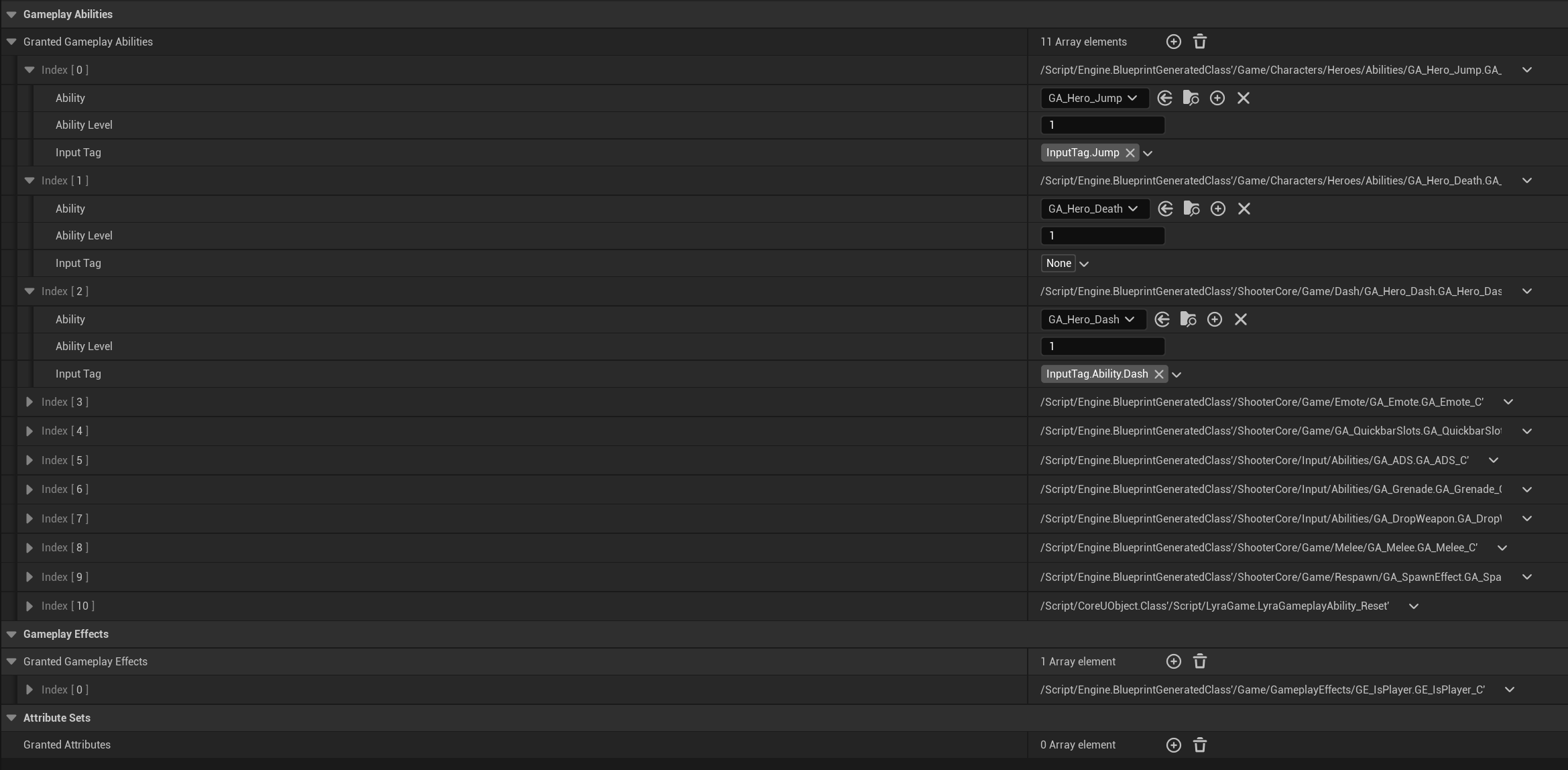
First, look at the AbilitySet_Elimination DA table (it inherits from LyraAbilitySet).
Opening AbilitySet_Elimination reveals two GAs. GA_ShowLeaderboard_TDM is used to press Tab to show the scoreboard. GA_AutoRespawn is used for death and respawn. These two GAs are unrelated to Character combat and can execute without a Character.
Next, look at the AbilitySet_ShooterPistol DA table (stored inside the parent table HeroData_ShooterGame, which inherits from ULyraPawnData).
Contains Character-related GAs, and quite a few of them. For example, GA_Hero_Jump implements jumping, and GA_Emote implements emote animations.
There is also AbilitySet_ShooterPistol.
It is not defined in the B_BasicShooterTest master table.
Instead, it is called by a specific Blueprint through WID_Pistol.
Then for each GA, UAbilitySystemComponent::GiveAbility is called to grant it.
This gets called in many places.
1 2 3 4 5 6 7 8 9 10 11 12 13 14 15 16 17 18
FGameplayAbilitySpecHandle UAbilitySystemComponent::GiveAbility(const FGameplayAbilitySpec& Spec) { ABILITYLIST_SCOPE_LOCK(); FGameplayAbilitySpec& OwnedSpec = ActivatableAbilities.Items[ActivatableAbilities.Items.Add(Spec)]; if (OwnedSpec.Ability->GetInstancingPolicy() == EGameplayAbilityInstancingPolicy::InstancedPerActor) { // Create the instance at creation time CreateNewInstanceOfAbility(OwnedSpec, Spec.Ability); } OnGiveAbility(OwnedSpec); MarkAbilitySpecDirty(OwnedSpec, true);
The function parameter is FGameplayAbilitySpec, which describes “this particular grant.”
It contains not only the description of the grant (such as the GA’s Class, the GA’s level, and the input Tag bound to the GA), but is also the runtime representation of the GA on the ASC, carrying a lot of runtime information. Each Spec has a unique ID called a Handle, assigned via auto-increment; all cross-system Spec passing is done through Handles.
Worth noting is the Spec.SourceObject property, which represents the “most closely associated” Object for this GA and is specified by us at creation time. For example, GA_Weapon_Fire_Pistol is the pistol firing GA — its SourceObject is the weapon instance B_WeaponInstance_Pistol. GA_Hero_Jump is the character jump GA — its SourceObject is the Character. GA_ShowLeaderboard_TDM is a scoreboard GA unrelated to combat — its SourceObject is PlayerState.
1 2 3 4 5 6 7 8 9 10 11 12 13
USTRUCT(BlueprintType) struct GAMEPLAYABILITIES_API FGameplayAbilitySpec : public FFastArraySerializerItem { GENERATED_USTRUCT_BODY()
On add, the Spec is first added to the ActivatableAbilities array, then a GA instance is created based on the Policy (the default InstancedPerActor does create one). Once created, if the GA is set to network sync, it’s added to Spec.ReplicatedInstances; otherwise it goes into Spec.NonReplicatedInstances.
Registering Triggers
GAs can be bound to Triggers, which are essentially Tags. When a GameplayEvent is sent with the corresponding Tag, the GA can be activated.
These Tags make it easier to identify specific GAs.
First, InputTag — this is not part of the GAS framework itself; it’s Lyra’s own mapping between input and GAs. The InputTag is specified in the AbilitySet.
AbilitySet_ShooterPisto
AbilitySet_ShooterPistol
AbilitySet_ShooterPisto
When the Spec is created, the InputTag is added to its DynamicSpecSourceTags — a general-purpose Tag container. These Tags live inside the FGameplayAbilitySpec struct. In other words, a single FGameplayAbilitySpec represents one granted Ability, and it contains many DynamicAbilityTags.
voidULyraAbilitySet::GiveToAbilitySystem(ULyraAbilitySystemComponent* LyraASC, FLyraAbilitySet_GrantedHandles* OutGrantedHandles, UObject* SourceObject)const { ... // Grant the attribute sets. for (int32 SetIndex = 0; SetIndex < GrantedAttributes.Num(); ++SetIndex) { ... }
// Grant the gameplay abilities. for (int32 AbilityIndex = 0; AbilityIndex < GrantedGameplayAbilities.Num(); ++AbilityIndex) { const FLyraAbilitySet_GameplayAbility& AbilityToGrant = GrantedGameplayAbilities[AbilityIndex];
if (!IsValid(AbilityToGrant.Ability)) { UE_LOG(LogLyraAbilitySystem, Error, TEXT("GrantedGameplayAbilities[%d] on ability set [%s] is not valid."), AbilityIndex, *GetNameSafe(this)); continue; }
if (OutGrantedHandles) { OutGrantedHandles->AddAbilitySpecHandle(AbilitySpecHandle); } }
// Grant the gameplay effects. for (int32 EffectIndex = 0; EffectIndex < GrantedGameplayEffects.Num(); ++EffectIndex) { ... } }
When granting ASC abilities, Tags, Effects, and other information are passed in together.
The above is the complete process for the server to initialize the ASC and grant GAs.
Syncing to Clients
ASC
First, the ASC as a Component mounted on the PlayerState is replicable.
Since the AvatarActor is the Character, the final setting of OwnerActor and AvatarActor must wait until the client’s Character has been created.
Specifically: after the Character is created, it triggers the LyraHeroComponent’s asset-loading flow. When loading completes and the client has obtained the PlayerState, the current stage is set to DataAvailable, and OwnerActor and AvatarActor are finally set.
GASpec
The Spec is stored in the ActivatableAbilities container, which itself is a FastArray marked Replicated and syncs normally over the network.
Once the Spec is synced to the client, the FastArray triggers FGameplayAbilitySpec::PostReplicatedAdd(), which in turn calls the same UAbilitySystemComponent::OnGiveAbility() method as the server to register the Spec.
For GAs that are not replicated but are InstancedPerActor, instances are created at this point, added to the NonReplicatedInstances array, and then AbilityTriggers are registered.
GA Instances inside a Spec
First, GA instances are only synced to Autonomous clients — they are not synced to SimulatedProxies. Then, the GA instance is synced as a SubObject of the ASC, which is a mechanism natively supported by UE.
Passing Complex Parameters Through GAS via Custom GAs
Module and Layer Structure (Diagram)
It can be called directly from the UI layer. A single GA can do multiple things. It has callbacks back to the UI.
Key concepts: GAS logic → created as a child GA Blueprint → managed by Experience → triggered by GAS → complex settings parameters passed via RPC → ServerOnly Actor creation → properties replicated back to clients via Replicated.
#pragma once #include"GameplayAbilitySystem/SubGameAbility/RequestBridge/TCGRequestBridgeTypes.h" #include"Text3DActor.h" #include"Text3DComponent.h" #include"Materials/MaterialInterface.h" #include"Extensions/Text3DDefaultMaterialExtension.h" #include"FTcg3dTextParams.generated.h" /** * Gameplay Ability for creating 3DText * Dynamically creates a Text3D Actor when the Ability activates, with automatic network sync */
/** Target Actor for Modify; can be null for Create */ UPROPERTY(BlueprintReadWrite, EditAnywhere) TObjectPtr<AActor> TargetActor = nullptr;
/** Whether this is a Modify request (true=Modify, false=Create). This struct is used for both GA modify and create, so this distinguishes the pipeline */ UPROPERTY(BlueprintReadWrite, EditAnywhere) bool bIsModify = false;
// Text content UPROPERTY(BlueprintReadWrite, EditAnywhere) FText InitialText = FText::FromString(TEXT("New Text"));
// Text size UPROPERTY(BlueprintReadWrite, EditAnywhere) float TextSize = 50.0f;
// Whether to use outline UPROPERTY(BlueprintReadWrite, EditAnywhere) bool bOutLine = false;
// 4 material parameters for the font UPROPERTY(BlueprintReadWrite, EditAnywhere, Category = "TCG|3DText|Material") TObjectPtr<UMaterialInterface> FrontMaterial = nullptr;
UPROPERTY(BlueprintReadWrite, EditAnywhere, Category = "TCG|3DText|Material") TObjectPtr<UMaterialInterface> BackMaterial = nullptr; // The 3DText Actor class to use (if null, defaults to AActor + TextRenderComponent) UPROPERTY(BlueprintReadWrite, EditAnywhere) TSubclassOf<AActor> Text3DActorClass = nullptr;
// Optional: specify the Owner of this 3DText (usually PlayerController or Pawn). UPROPERTY(BlueprintReadWrite, EditAnywhere) TObjectPtr<AActor> OwnerActor = nullptr;
// Optional: specify the Instigator (usually a Pawn). UPROPERTY(BlueprintReadWrite, EditAnywhere) TObjectPtr<APawn> InstigatorPawn = nullptr;
/** * Applies the current parameters to a `UText3DComponent`. * Note: this is a pure utility function with no Actor/World dependency, for easy reuse on server/client. */ staticvoidApplyToComponent(UText3DComponent* Text3DComponent, const FTcg3dTextParams& InParams) { if (!Text3DComponent) { return; } Text3DComponent->SetVisibility(InParams.bVisible); Text3DComponent->SetText(InParams.InitialText); Text3DComponent->SetWorldScale3D(FVector(InParams.TextSize, InParams.TextSize, InParams.TextSize)); Text3DComponent->SetHasOutline(InParams.bOutLine); Text3DComponent->SetWorldLocation(InParams.SpawnLocation); Text3DComponent->SetWorldRotation(InParams.SpawnRotation); // If using custom materials, switch the Text3D material style to Custom (UE5.6 Text3D plugin) if (InParams.FrontMaterial || InParams.BevelMaterial || InParams.ExtrudeMaterial || InParams.BackMaterial) { if (UText3DDefaultMaterialExtension* DefaultMaterialExt = Cast<UText3DDefaultMaterialExtension>(Text3DComponent->GetMaterialExtension())) { DefaultMaterialExt->SetStyle(EText3DMaterialStyle::Custom); } }
// Material application: Text3D plugin provides named APIs (UE5.6) if (InParams.FrontMaterial) { Text3DComponent->SetFrontMaterial(InParams.FrontMaterial); } if (InParams.BevelMaterial) { Text3DComponent->SetBevelMaterial(InParams.BevelMaterial); } if (InParams.ExtrudeMaterial) { Text3DComponent->SetExtrudeMaterial(InParams.ExtrudeMaterial); } if (InParams.BackMaterial) { Text3DComponent->SetBackMaterial(InParams.BackMaterial); } }
boolUTCG3DTextModifierLibrary::RegisterRequestCallback(UAbilitySystemComponent* ASC, const FGuid& RequestId, UObject* CallbackObject, FName CallbackFunctionName, const TCHAR* Context) { if (!CallbackObject || CallbackFunctionName.IsNone()) { UE_LOG(LogTemp, Warning, TEXT("%s: CallbackObject/CallbackFunctionName invalid. Request will still be sent but no callback will be executed."), Context); returnfalse; }
UFunction* CallbackFunc = CallbackObject->FindFunction(CallbackFunctionName); if (!CallbackFunc) { UE_LOG(LogTemp, Warning, TEXT("%s: Callback function '%s' not found on object '%s'. Request will still be sent but no callback will be executed."), Context, *CallbackFunctionName.ToString(), *GetNameSafe(CallbackObject)); returnfalse; }
if (!bSignatureOk) { UE_LOG(LogTemp, Warning, TEXT("%s: Callback function '%s' on '%s' has invalid signature. Expected exactly one param: (AActor*). Request will still be sent but no callback will be executed."), Context, *CallbackFunctionName.ToString(), *GetNameSafe(CallbackObject)); returnfalse; }
if (UWorld* World = ASC->GetWorld()) { if (UGameInstance* GI = World->GetGameInstance()) { if (UTCGRequestCallbackSubsystem* RequestCallbackSubsystem = GI->GetSubsystem<UTCGRequestCallbackSubsystem>()) { UTCGRequestCallbackSubsystem::FTCGOnRequestCompleted Wrapper; Wrapper.BindUFunction(CallbackObject, CallbackFunctionName); RequestCallbackSubsystem->RegisterPendingCallback(RequestId, Wrapper); returntrue; } } }
returnfalse; }
voidUTCG3DTextModifierLibrary::CancelRequestCallback(UAbilitySystemComponent* ASC, const FGuid& RequestId) { if (UWorld* World = ASC ? ASC->GetWorld() : nullptr) { if (UGameInstance* GI = World->GetGameInstance()) { if (UTCGRequestCallbackSubsystem* RequestCallbackSubsystem = GI->GetSubsystem<UTCGRequestCallbackSubsystem>()) { RequestCallbackSubsystem->Cancel(RequestId); } } } }
FGameplayAbilitySpec* Spec = nullptr; UTCGAbility_Create3DText* AbilityInstance = nullptr; if (!FindAbilitySpec<UTCGAbility_Create3DText>(ASC, Spec, AbilityInstance)) { UE_LOG(LogTemp, Warning, TEXT("%s: Player does not have Create3DText Ability! Please grant it first."), Context); returnfalse; }
if (!TargetText3DActor) { UE_LOG(LogTemp, Warning, TEXT("%s: TargetText3DActor is null!"), Context); returnfalse; }
FGameplayAbilitySpec* Spec = nullptr; UTCGAbility_Create3DText* AbilityInstance = nullptr; if (!FindAbilitySpec<UTCGAbility_Create3DText>(ASC, Spec, AbilityInstance)) { UE_LOG(LogTemp, Warning, TEXT("%s: Player does not have 3DText Ability! Please grant it first."), Context); returnfalse; }
// Delegate: callback when a 3DText Actor has been created DECLARE_DYNAMIC_DELEGATE_OneParam(FOnText3DCreatedCallback, AActor*, CreatedActor);
/** * Blueprint Function Library - simplifies the UI's interface for calling the 3DText creation Ability * Provides functionality for dynamically creating 3DText Actors [not designed for reuse] */ UCLASS() classTCG_AWESOMELIVE_APIUTCG3DTextModifierLibrary : public UBlueprintFunctionLibrary { GENERATED_BODY()
voidUTCGAbility_Create3DText::ServerText3DActor_Implementation(const FTcg3dTextParams& Params) { // Unified entry point: both Create and Modify go through the same Server RPC if (Params.bIsModify) { ATCGReplicatedText3DActor* RepTextActor = Cast<ATCGReplicatedText3DActor>(Params.TargetActor); if (RepTextActor && RepTextActor->HasAuthority()) { RepTextActor->UpdateFromParams_Server(Params); } return; }
AActor* AvatarActor = GetAvatarActorFromActorInfo(); if (!AvatarActor) { UE_LOG(LogTemp, Warning, TEXT("UTCGAbility_Create3DText: Avatar Actor is null!")); returnnullptr; }
UWorld* World = GetWorld(); if (!World) { UE_LOG(LogTemp, Warning, TEXT("UTCGAbility_Create3DText: World is null!")); returnnullptr; }
// Only execute on the server if (!AvatarActor->HasAuthority()) { UE_LOG(LogTemp, Warning, TEXT("UTCGAbility_Create3DText: Not on server!")); returnnullptr; }
// If the caller explicitly provided an Owner/Instigator (usually from PlayerController), use it preferentially if (Params.OwnerActor) { SpawnParams.Owner = Params.OwnerActor; } if (Params.InstigatorPawn) { SpawnParams.Instigator = Params.InstigatorPawn; }
// If no class is specified, use the default implementation with RepNotify sync TSubclassOf<AActor> ActorClassToSpawn = Params.Text3DActorClass; if (!ActorClassToSpawn) { ActorClassToSpawn = ATCGReplicatedText3DActor::StaticClass(); }
// If an Actor class was specified, use it AActor* SpawnedActor = World->SpawnActor<AActor>( ActorClassToSpawn, Params.SpawnLocation, Params.SpawnRotation, SpawnParams );
// Set Replicate (critical!) SpawnedActor->SetReplicates(true); SpawnedActor->SetReplicateMovement(true);
// If there's an Owner, use owner relevancy (saves bandwidth and semantically means "belonging to a player") if (SpawnParams.Owner) { SpawnedActor->SetOwner(SpawnParams.Owner); SpawnedActor->bNetUseOwnerRelevancy = true; }
// If this is our custom replicable Text3D Actor, write the parameters into the RepNotify variable so the client also applies them if (ATCGReplicatedText3DActor* RepTextActor = Cast<ATCGReplicatedText3DActor>(SpawnedActor)) { RepTextActor->InitializeFromParams_Server(Params); }
/** * Ability for creating and managing dynamic 3DText Actors * * Workflow: * 1. Client UI calls → Ability activates * 2. Ability creates Actor on the server * 3. Actor auto-replicates to all clients * 4. Returns the created Actor reference to the caller */ UCLASS() classTCG_AWESOMELIVE_APIUTCGAbility_Create3DText : public UTCGGameplayAbility { GENERATED_BODY()
// Server RPC - creates the Actor on the server UFUNCTION(Server, Reliable) voidServerText3DActor(const FTcg3dTextParams& Params);
// The function that actually creates the Actor on the server (only called on the server) UFUNCTION(BlueprintCallable, Category = "TCG|3DText") AActor* SpawnText3DActor(const FTcg3dTextParams& Params);
public: // Current creation parameters UPROPERTY() FTcg3dTextParams CurrentParams;
// Reference to the most recently created Actor (for returning to the caller) UPROPERTY() AActor* LastCreatedActor;
// Delegate: fires when the Actor creation completes (bindable in Blueprint) DECLARE_DYNAMIC_MULTICAST_DELEGATE_OneParam(FOnText3DActorCreated, AActor*, CreatedActor); UPROPERTY(BlueprintAssignable, Category = "TCG|3DText") FOnText3DActorCreated OnText3DActorCreated; };
#include"CoreMinimal.h" #include"Text3DActor.h" #include"TCGAbility_Create3DText.h"// for FTCG3DTextParams #include"TCGReplicatedText3DActor.generated.h"
/** * A Text3D Actor that replicates its "display parameters." * Note: UE by default only replicates Actor/Component Transform and Movement. * Text3DComponent text/materials etc. are not automatically replicated. * Here we use RepNotify to sync server-side parameters to the client, then apply them to the component on the client. */
UCLASS() classTCG_AWESOMELIVE_APIATCGReplicatedText3DActor : public AText3DActor { GENERATED_BODY()
public: ATCGReplicatedText3DActor();
// Broadcast after the client receives and applies the parameters via OnRep UPROPERTY(BlueprintAssignable, Category = "TCG|3DText") FTCGOnText3DInitialized OnText3DInitialized;
/** * Called on server: sets initial parameters, applies them immediately, then replicates them to clients. */ UFUNCTION(BlueprintCallable, Category = "TCG|3DText") voidInitializeFromParams_Server(const FTcg3dTextParams& InParams);
/** Server: updates the replicated parameters on an existing Actor, then ForceNetUpdate + client callback */ UFUNCTION(BlueprintCallable, Category = "TCG|3DText") voidUpdateFromParams_Server(const FTcg3dTextParams& InParams);
/** Read the current replicated parameters (read-only) */ const FTcg3dTextParams& GetReplicatedParams()const { return ReplicatedParams; }
protected: UPROPERTY(ReplicatedUsing = OnRep_TextParams) FTcg3dTextParams ReplicatedParams; /** RepNotify callback: called when ReplicatedParams changes (the macro has UE's network framework call this) */ UFUNCTION() voidOnRep_TextParams();
/** * Generic request header (Base): used to precisely associate a "request" with a future callback. * It is recommended that each business Params struct contains a `Header` field to carry RequestId / RequestType / RequestingActor uniformly. */ USTRUCT(BlueprintType) structTCG_AWESOMELIVE_APIFTCGRequestHeaderBase { GENERATED_BODY()
/** Unique request ID (generated on the client) */ UPROPERTY(BlueprintReadWrite, EditAnywhere, Category="TCG|Request") FGuid RequestId = FGuid::NewGuid();
/** Optional: the initiator (usually PlayerController or Pawn) */ UPROPERTY(BlueprintReadWrite, EditAnywhere, Category="TCG|Request") TObjectPtr<AActor> RequestingActor = nullptr; };
Blueprints Spawned Over the Network via GAS Must Consider Ownership
If a Blueprint is spawned on the server, you must specify an “Owner” — this designates who owns the spawned object across all network clients. When the owner needs to execute a networked Event internally, it needs to notify a specific client. Without an Owner, that Event will be rejected.
Random Number Issues
Be aware that random numbers generated on the network client and on the server will differ.
Getting the “Event Instigator” and “Event Target” Inside a GE
As shown above, I had a requirement for a projectile. I needed to pass both “the projectile object” and “the person it hit” to the GE. In my case, “the person hit” is the Owner of the ASC being executed on (i.e., the Instigator here), and must be provided when applying the GE.
When calling BP_ApplyGameplayEffectToTarget, it internally:
Uses the “Target ASC’s Owner / Avatar Actor” to construct an FGameplayEffectContextHandle;
Automatically fills in Instigator, EffectCauser, and other fields in that EffectContext;
Places this EffectContext into an FGameplayEffectSpec, and finally applies it to the Target;
(As shown in the image, there are actually two Target nodes — the one on top is the Target that calls this event (common in Blueprints), and the one on the bottom is the person who was hit. They share the same name “Target” which causes some confusion here.)
This part is fairly straightforward. However, inside GC there is an internal struct with three variables for expressing “event responsibility parties”:
/** Instigator actor, the actor that owns the ability system component */ UPROPERTY(BlueprintReadWrite, Category=GameplayCue) TWeakObjectPtr<AActor> Instigator;
/** The physical actor that actually did the damage, can be a weapon or projectile */ UPROPERTY(BlueprintReadWrite, Category=GameplayCue) TWeakObjectPtr<AActor> EffectCauser;
/** Object this effect was created from, can be an actor or static object. Useful to bind an effect to a gameplay object */ UPROPERTY(BlueprintReadWrite, Category=GameplayCue) TWeakObjectPtr<const UObject> SourceObject; }
Found in UE_5.6\Engine\Plugins\Runtime\GameplayAbilities\Source\GameplayAbilities\Public\GameplayEffectTypes.h.
These three are: Instigator, EffectCauser, and SourceObject.
According to the documentation, their respective “responsibilities” are:
Instigator: Who is the “controller that applied this effect,” typically the Pawn/Character.
EffectCauser: Which Actor/Component “actually caused this effect” — for example, a weapon or projectile.
SourceObject: A fully open UObject* for you to use as you see fit — can be a weapon instance, ability instance, DataAsset, projectile, etc.
These three fields aren’t always populated — whether they’re filled automatically depends on the GAS call path you take. In the typical application path, Instigator and EffectCauser are the same value, both being the ASC’s owner. SourceObject is usually null (GAs that actively trigger a GE have a chance to pass the GA’s SourceObject into it), so you can specify it yourself and use it for your own parameters.






 AbilitySet_ShooterPisto


