Shader Learning Notes

Unreal Shader Learning

Installation and Basic Concepts

Zhihu: “Shader from Zero to Hero” — you can install ShaderToy in VS to experiment with GLSL
👆 This written tutorial is also really solid.

Unreal 5.0 — Adding Custom Shader Code Inside a Material — In UE you need to configure the shader file path.

The typical 3D pipeline looks like this: “Concept artist draws the scene (translating the 3D world onto paper) -> Modeler builds scene geometry based on the concept art (outputting 3D models) -> Programmer renders it (importing the 3D models into an engine or other 3D rendering library) and outputs the final image.”

3D Rendering Pipeline Shader Types

There are two primary shader types:

  1. Fragment Shader (pixel shader): takes interpolated vertex data as input and outputs the final pixel color (fragColor).

  2. Vertex Shader: takes individual vertex data (position, normals, etc.) as input and outputs the transformed vertex position (gl_Position) along with other interpolated data.

  3. Compute Shader

  4. Geometry Shader

HLSL

Basic Syntax

Function Description
min max Minimum and maximum
abs Absolute value
fmod Modulo operation
round Round to nearest integer
pow Exponentiation
sqrt rsqrt Square root and reciprocal square root
degrees(x) / radians Radians to degrees / degrees to radians
length Distance from a vector to the origin
frac(sin(dot(uv, float2(12.9898, 78.233))) * 43758.5453) Noise algorithm
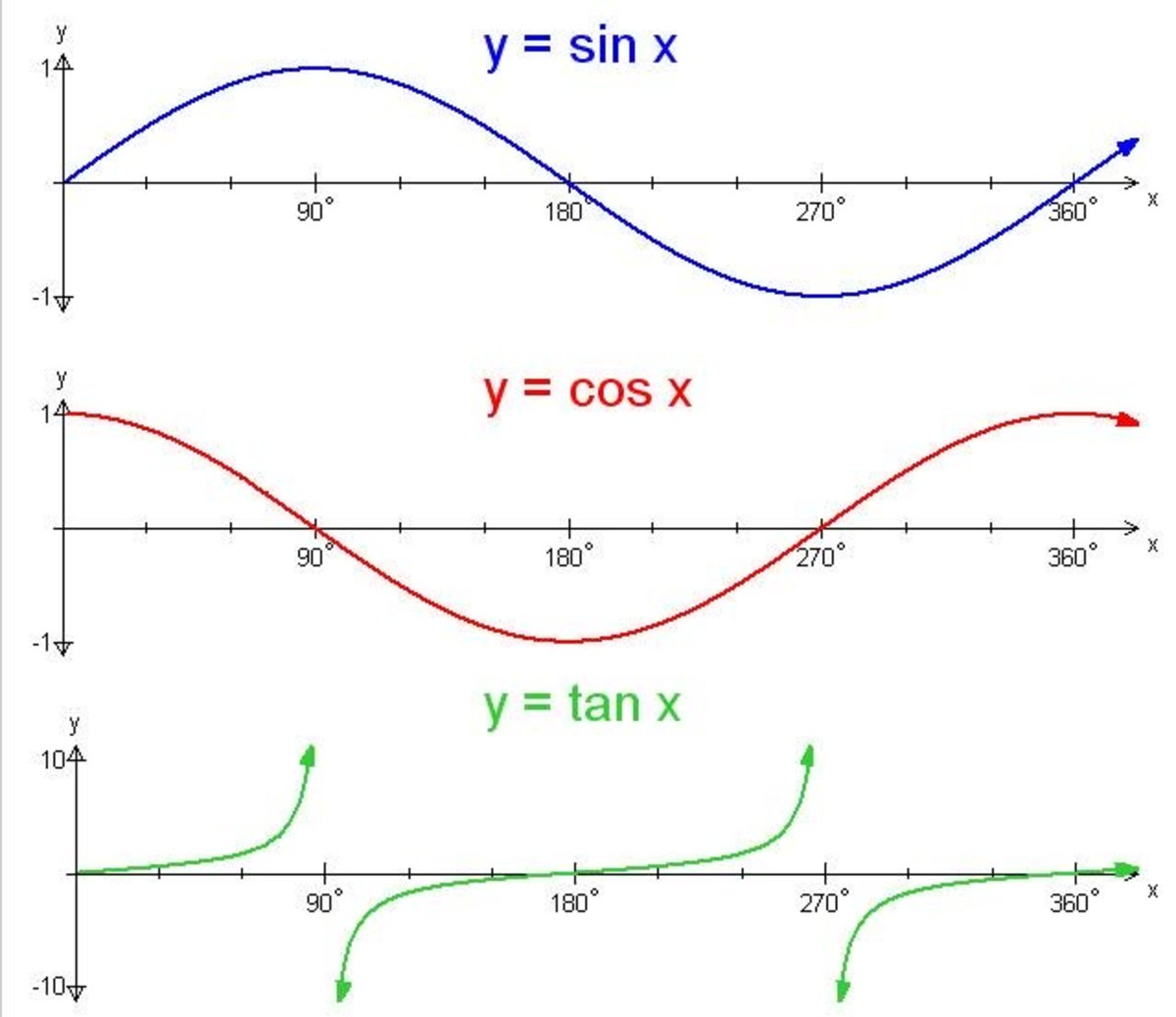
sin cos tan Trigonometric functions
asin acos atan Their inverse functions
sinh cosh tanh Hyperbolic functions
ceil Ceiling function
Unreal Shader Learning-1

UV Coordinate System:

  • Origin (0,0) is at the bottom-left
  • (0,1) top-left, (1,1) top-right, (1,0) bottom-right

GLSL

Basic Syntax

step

If x is less than some value, returns 0; if x is greater than or equal to that value, returns 1.

So the code above can be simplified to:

1
2
3
4
5
6
// if(abs(uv.x) <= 2. * fwidth(uv.x)) {
// color = vec3(0.0, 1.0, 0.0);
// }
// ===>

color = step(abs(uv.x), 2.0 * fwidth(uv.x)) * vec3(0.0, 1.0, 0.0);

mix

This function essentially performs a simple linear interpolation. In plain terms: when a = 1, it returns y; when a = 0, it returns x; when a = 0.5, it returns 0.5x + 0.5y; and if a = 0.2, it returns 0.8 * x + 0.2 * y.

We can use this function for color blending. The color blending formula can be written as:
$$
Color=Src.color∗(1−Dst.a)+Dst.color∗Dst.a
$$

smoothstep

ShaderSmoothstep

We can see intuitively: when x < 0 it returns 0, when x > 1 it returns 1, and for x between 0 and 1 there’s a transition similar to linear interpolation — but note that it is not actually linear, because the function eases in and out smoothly near both ends. This property makes it a great replacement for the step function to eliminate aliasing.

floor

The floor function rounds down — it returns the largest integer not greater than the input. For example, applied to each component (x and y) of a uv vector individually:

Example:

1
2
floor(3.7)  → 3.0
floor(-1.2) → -2.0

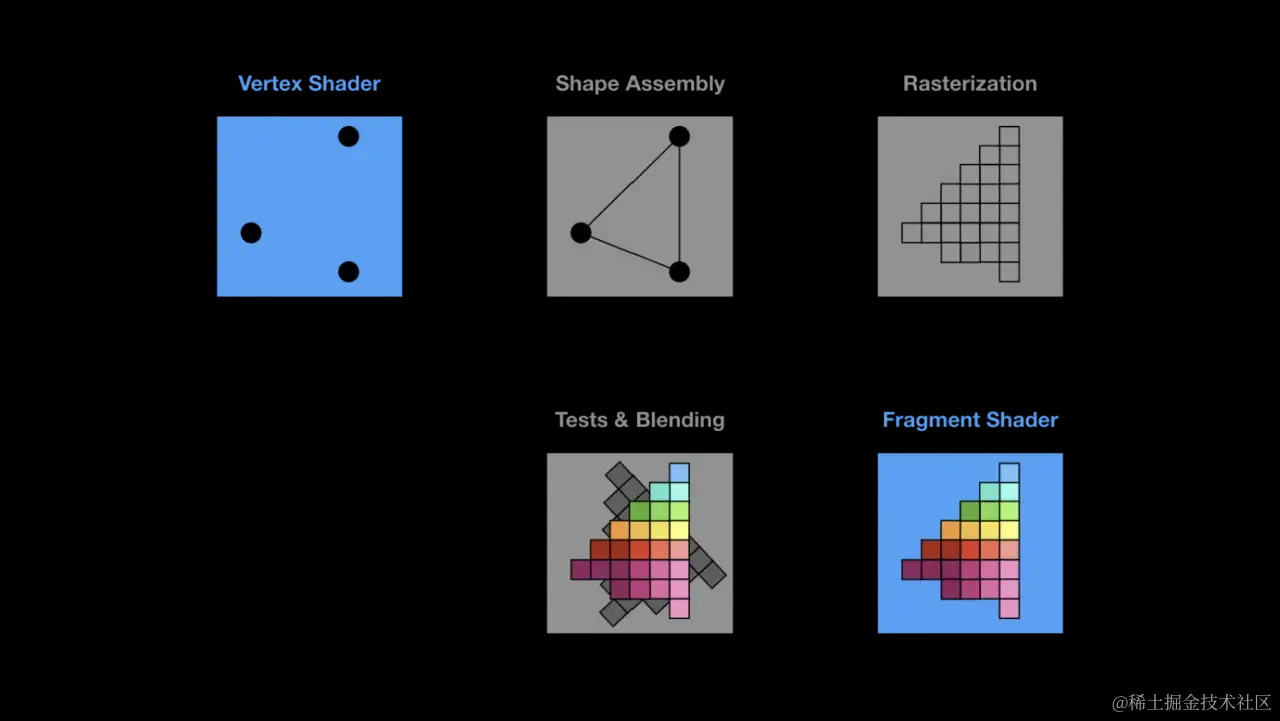
Core Steps (Rendering Pipeline)

  1. Vertex transformation (vertex shader)
  2. Primitive assembly (deciding how to assemble primitives — as points, lines, or triangles)
  3. Rasterization (converting the primitives from vector form into pixel-based raster images)
  4. Shading (fragment shader)
  5. Testing (Alpha test, depth test, stencil test, etc.) & blending
WXWorkCapture_17531696303010

Coordinate Systems

image-20250722154307710 image-20250722154418915

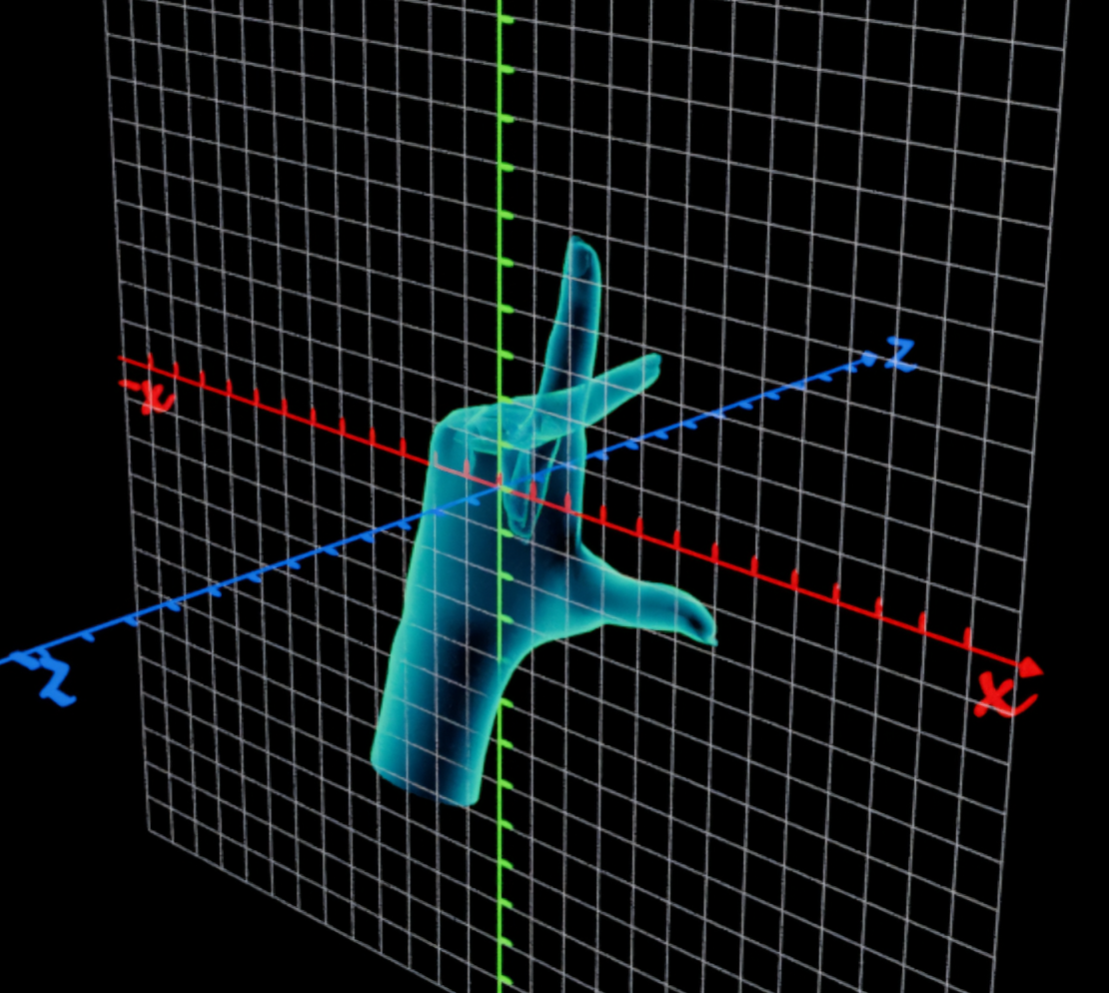
This is a left-handed coordinate system; the opposite is a right-handed coordinate system.

OpenGL uses a right-handed coordinate system.

Implementation Code

1. The Most Basic Example (Drawing a Coordinate Axis):

1
2
3
4
5
6
7
8
9
10
11
12
13
14
15
16
17
18
19
20
21
22
23
24
25
26
27
28
29
30
31
32
33
34
35
36
37
38
39
40
41
42
43
44
45
46
47
48
49
50
// Normalize UV coordinates to the [-1,1] range while preserving aspect ratio
vec2 fixUV(vec2 coord) {
return 2.0 * (coord - 0.5 * iResolution.xy) / min(iResolution.x, iResolution.y);
}

// Draw grid lines
bool drawGrid(vec2 uv, float scale) {
// fract(uv * scale): scales the coordinate then takes the fractional part, giving relative position within each cell
// fwidth(f_uv.x): computes the gradient between adjacent pixels in the fragment shader, i.e. the rate of change from one pixel to the next
vec2 f_uv = fract(uv * scale);
// abs(f_uv.x) < fwidth(f_uv.x): returns true when the relative coordinate is near 0 (i.e. at the grid line position)
return abs(f_uv.x) < fwidth(f_uv.x) || abs(f_uv.y) < fwidth(f_uv.y);
}

// Draw coordinate axes
vec3 drawAxis(vec2 uv) {
vec3 color = vec3(0.0);

if(abs(uv.x) < fwidth(uv.x)) {
color = vec3(0.0, 1.0, 0.0); // x-axis in green
}

if(abs(uv.y) < fwidth(uv.y)) {
color = vec3(1.0, 0.0, 0.0); // y-axis in red
}

return color;
}

// Main function
void mainImage(out vec4 fragColor, in vec2 fragCoord) {
// Normalize coordinates
vec2 uv = fixUV(fragCoord);

// Base background color
vec3 color = vec3(0.0);

// Draw grid
if(drawGrid(uv, 3.0)) {
color = vec3(1.0);
}

// Draw axes (they overdraw the grid lines)
vec3 axisColor = drawAxis(uv);
if(axisColor != vec3(0.0)) {
color = axisColor;
}

fragColor = vec4(color, 1.0);
}

ShaderToy Preview — This shader creates a coordinate system with grid lines and colored axes.

2. Drawing a Linear Function y=kx

1
2
3
4
5
6
7
8
9
10
11
12
13
14
15
16
17
18
19
20
21
22
23
24
25
26
27
28
29
30
31
32
33
34
35
36
37
38
39
40
41
42
43
44
45
46
47
48
49
50
51
52
53
// Normalize UV coordinates to the [-1,1] range while preserving aspect ratio
vec2 fixUV(vec2 coord) {
return 2.0 * (coord - 0.5 * iResolution.xy) / min(iResolution.x, iResolution.y);
}

// Draw grid lines
bool drawGrid(vec2 uv, float scale) {
vec2 f_uv = fract(uv * scale);
return abs(f_uv.x) < fwidth(f_uv.x) || abs(f_uv.y) < fwidth(f_uv.y);
}

// Draw coordinate axes
vec3 drawAxis(vec2 uv) {
vec3 color = vec3(0.0);

if(abs(uv.x) < fwidth(uv.x)) {
color = vec3(0.0, 1.0, 0.0); // x-axis in green
}

if(abs(uv.y) < fwidth(uv.y)) {
color = vec3(1.0, 0.0, 0.0); // y-axis in red
}

return color;
}

// Vector-based point-to-line distance
// This function computes the shortest distance from point p to segment ab
// a and b are the two endpoints of the segment
float distLine(vec2 p, vec2 a, vec2 b) {
vec2 ab = b - a;
vec2 ap = p - a;
vec2 ad = dot(ab, ap) / dot(ab, ab) * ab;
return length(ap - ad);
}

// Main function
void mainImage(out vec4 fragColor, in vec2 fragCoord) {
// Old part
vec2 uv = fixUV(fragCoord);
vec3 color = vec3(0.0);
if(drawGrid(uv, 10.0)) {
color = vec3(1.0);
}
vec3 axisColor = drawAxis(uv);
if(axisColor != vec3(0.0)) {
color = axisColor;
}

float d = distLine(uv, vec2(0.0), vec2(1.0));
color = mix(color, vec3(0.0,0.0,1.0), smoothstep(0.002, 0.001, d));
fragColor = vec4(color, 1.0);
}

ShaderToy Preview

3. Drawing a Complex Function (Segment-by-Segment)

1
2
3
4
5
6
7
8
9
10
11
12
13
14
15
16
17
18
19
20
21
22
23
24
25
26
27
28
29
30
31
32
33
34
35
36
37
38
39
40
41
42
43
44
45
46
47
48
49
50
51
52
53
54
55
56
57
58
59
60
61
62
63
64
65
66
67
68
69
#define PI 3.1415926
#define STEP 1.0

vec2 fixUV(vec2 coord) {
return 3.0 * (2. * (coord.xy - 0.5 * iResolution.xy) / min(iResolution.x, iResolution.y));
}

vec3 grid(vec2 uv) {
vec3 color = vec3(0.95);

vec2 cell = 1.0 - 2.0 * abs(fract(uv) - 0.5);
color = mix(color, vec3(0.7), step(cell.x, 4.0 * fwidth(uv.x)));
color = mix(color, vec3(0.7), smoothstep(4.0 * fwidth(uv.y), 3.9 * fwidth(uv.y), cell.y));
color = mix(color, vec3(0.3, 0.7, 0.8), smoothstep(2.0 * fwidth(uv.x), 1.9 * fwidth(uv.x), abs(uv.x)));
color = mix(color, vec3(1.0, 0.5, 0.0), smoothstep(2.0 * fwidth(uv.x), 1.9 * fwidth(uv.y), abs(uv.y)));

return color;
}

float func(in float x) {
return sin(x + sin(x + sin(x) * 0.8));
}

float distLine(vec2 p, vec2 a, vec2 b) {
vec2 ab = b - a;
vec2 ap = p - a;
vec2 ad = clamp(dot(ab, ap) / dot(ab, ab), 0.0, 1.0) * ab;
return length(ap - ad);
}

// This is a math function that returns a float representing the "influence" of a segment.
// The returned float indicates how close the current pixel (uv) is to the segment.
// Value ranges from 0.0 to 1.0:
// 0.0 means the pixel is completely outside the segment
// 1.0 means the pixel lies exactly on the segment
// Intermediate values indicate the pixel is near the segment (anti-aliased)
float segment(vec2 p, vec2 a, vec2 b, float w) {
float f = 0.0;
vec2 ab = b - a;
vec2 ap = p - a;
float proj = clamp(dot(ab, ap) / dot(ab, ab), 0.0, 1.0);
float d = length(ap - proj * ab);
f = smoothstep(w, w * 0.2, d);
return f;
}

float plotFunc(in vec2 uv) {
float f = 0.0;
// Loop from 0 to screen width (iResolution.x)
// STEP is the step size (defined as 1.0), controlling sample density
for(float x = 0.0; x <= iResolution.x; x += STEP) {
// Coordinate of the current point
float fx = fixUV(vec2(x, 0.0)).x;
// Coordinate of the next point
float nfx = fixUV(vec2(x + STEP, 0.0)).x;
f += segment(uv, vec2(fx, func(fx)), vec2(nfx, func(nfx)), 0.006);
}
return f;
}

void mainImage(out vec4 fragColor, in vec2 fragCoord) {
// old
vec2 uv = fixUV(fragCoord.xy);
vec3 color = grid(uv);

float f = plotFunc(uv);
color = mix(color, vec3(0.0, 0.0, 0.0), f);
fragColor = vec4(color, 1.0);
}

ShaderToy Preview

4. A Static Star Flare Effect

1
2
3
4
5
6
7
8
9
10
11
12
13
14
15
16
17
18
19
20
21
22
23
24
25
26
27
28
29
30
31
32
33
34
35
36
37
38
39
40
41
42
43
44
45
46
47
48
49
50
51
52
53
54
55
56
57
58
59
60
61
62
63
64
65
66
67
68
69
70
71
72
73
74
75
76
77
78
79
80
81
82
83
84
85
86
87
88
#define PI 3.1415926
#define STEP 1.0

vec2 fixUV(vec2 coord) {
return 4.0 * (2. * (coord.xy - 0.5 * iResolution.xy) / min(iResolution.x, iResolution.y));
}

vec3 grid(vec2 uv) {
// Change the color drawn outside the coordinate area
vec3 color = vec3(0.0);
color.rg = fract(uv);

vec2 cell = 1.0 - 2.0 * abs(fract(uv) - 0.5);
// Vertical grid lines
color = mix(color, vec3(0.7), step(cell.x, 4.0 * fwidth(uv.x)));
// Horizontal grid lines
color = mix(color, vec3(0.7), smoothstep(4.0 * fwidth(uv.y), 3.9 * fwidth(uv.y), cell.y));
// Vertical axis
color = mix(color, vec3(0.3, 0.7, 0.8), smoothstep(2.0 * fwidth(uv.x), 1.9 * fwidth(uv.x), abs(uv.x)));
// Horizontal axis
color = mix(color, vec3(1.0, 0.5, 0.0), smoothstep(2.0 * fwidth(uv.x), 1.9 * fwidth(uv.y), abs(uv.y)));

return color;
}

float func(in float x) {
return sin(x + sin(x + sin(x) * 0.8));
}

float distLine(vec2 p, vec2 a, vec2 b) {
vec2 ab = b - a;
vec2 ap = p - a;
vec2 ad = clamp(dot(ab, ap) / dot(ab, ab), 0.0, 1.0) * ab;
return length(ap - ad);
}

float Line(vec2 p, vec2 a, vec2 b) {
float d = distLine(p, a, b);
float m = smoothstep(0.02, 0.01, d);
return m;
}

float segment(vec2 p, vec2 a, vec2 b, float w) {
float f = 0.0;
vec2 ab = b - a;
vec2 ap = p - a;
float proj = clamp(dot(ab, ap) / dot(ab, ab), 0.0, 1.0);
float d = length(ap - proj * ab);
f = smoothstep(w, w * 0.2, d);
return f;
}

void mainImage(out vec4 fragColor, in vec2 fragCoord) {
vec2 uv = fixUV(fragCoord.xy);

// Updated grid drawing function
vec3 Basecolor = grid(uv);

// Shift the local coordinate center to the middle of each cell
vec2 st = fract(uv) - 0.5;


// Create a 3x3 point grid
int i = 0;
vec2 p[9];
for(float y = -1.0; y <= 1.0; y++) {
for(float x = -1.0; x <= 1.0; x++) {
vec2 offs = vec2(x, y);
p[i++] = offs;
}
}

// Draw connecting lines (in blue)
float m2 = 0.0;
for(i = 0; i < 9; i++) {
m2 += Line(st, p[i], p[4]);
}
Basecolor = mix(Basecolor, vec3(0.0, 0.0, 1.0), m2); // Draw lines

// Draw the center dot in each cell (in red)
float d = length(st);
float m1 = smoothstep(0.1, 0.09, d);
Basecolor = mix(Basecolor, vec3(1.0), m1); // Draw dot


fragColor = vec4(Basecolor, 1.0);
return;
}
shadertoy4

5. Random Number Generation

1
2
3
4
5
6
7
8
9
10
11
12
13
14
15
16
17
18
19
20
21
22
23
24
25
26
27
28
29
30
31
32
33
vec2 N22(vec2 p) {

// Arbitrary large numbers — with a few constraints:
// You can replace these with other large numbers (e.g. vec2(123.45, 678.90))
// but you should avoid:
// Numbers that are too simple (e.g. 100.0, 200.0)
// Numbers that are multiples of each other (e.g. 50.0, 100.0)
// Numbers that have a simple mathematical relationship with the magic numbers below (123.34, etc.)
p += vec2(434.67, 534.23);

// Expand the 2D coordinate into a 3D vector p.xyx (e.g. input (x,y) becomes (x,y,x))
// Multiply by carefully chosen "magic number" vectors (these primes increase entropy)
// fract() takes the fractional part, keeping values in the [0,1) range
vec3 a = fract(p.xyx * vec3(123.34, 234.34, 345.65));

// Compute the dot product with itself and add it back (dot(a,a) computes autocorrelation)
// Add a 34.45 offset to break symmetry
// This step dramatically increases the randomness of the output
a += dot(a, a + 34.45);

return fract(vec2(a.x * a.y, a.y * a.z));
}

vec2 fixUV(vec2 coord) {
return 3.0 * (2. * (coord.xy - 0.5 * iResolution.xy) / min(iResolution.x, iResolution.y));
}

void mainImage(out vec4 fragColor, in vec2 fragCoord) {
vec2 uv = fixUV(fragCoord.xy);

vec2 n = N22(uv);
fragColor = vec4(n, 0.0, 1.0);
}
shadertoy5

6. Star Constellation Connection Effect

1
2
3
4
5
6
7
8
9
10
11
12
13
14
15
16
17
18
19
20
21
22
23
24
25
26
27
28
29
30
31
32
33
34
35
36
37
38
39
40
41
42
43
44
45
46
47
48
49
50
51
52
53
54
55
56
57
58
59
60
61
62
63
64
65
66
67
68
69
70
71
72
73
74
75
76
77
78
79
80
81
82
83
84
85
86
87
88
89
90
91
92
93
94
95
96
97
98
99
100
101
#define PI 3.1415926
#define STEP 1.0

vec2 fixUV(vec2 coord) {
return 5.0 * (2. * (coord.xy - 0.5 * iResolution.xy) / min(iResolution.x, iResolution.y));
}

float distLine(vec2 p, vec2 a, vec2 b) {
vec2 ab = b - a;
vec2 ap = p - a;
vec2 ad = clamp(dot(ab, ap) / dot(ab, ab), 0.0, 1.0) * ab;
return length(ap - ad);
}

float Line(vec2 p, vec2 a, vec2 b) {
float d = distLine(p, a, b); // Distance from point p to segment ab
float m = smoothstep(0.02, 0.01, d); // First smoothstep: generates the line width
float d2 = length(a - b); // Length of segment ab
m *= smoothstep(1.2, 1.1, d2);// Second smoothstep: controls whether the line is visible
return m;
}

vec2 N22(vec2 p) {
p += vec2(434.67, 534.23);
vec3 a = fract(p.xyx * vec3(123.34, 234.34, 345.65));
a += dot(a, a + 34.45);
return fract(vec2(a.x * a.y, a.y * a.z));
}

vec3 N23_to_3(vec2 p) {
// First layer hash
vec3 a = fract(p.xyx * vec3(123.34, 234.34, 345.65));
a += dot(a, a.yxz + 34.45);

// Second layer hash (using rotated coordinates)
vec3 b = fract(p.yxy * vec3(456.78, 567.89, 678.91));
b += dot(b, b.zxy + 45.67);

// Combine layers
vec3 r = fract(vec3(
a.x * b.y,
a.y * b.z,
a.z * b.x
));

// Final mixing
return fract(r * 0.5 + 0.5);
}

vec2 GetPos(vec2 id, vec2 offs) {
// Generate a random value from the cell id and offset,
// then multiply by iTime so the position changes over time
vec2 n = N22(id + offs) * iTime * 6.11; // 6.11 is a speed-control value
return sin(n) * 0.4 + offs;
}

void mainImage(out vec4 fragColor, in vec2 fragCoord) {

vec2 uv = fixUV(fragCoord.xy);
// Updated grid drawing function
vec3 Basecolor = vec3(0.0);
// Shift the local coordinate center to the middle of each cell
vec2 st = fract(uv) - 0.5;

// Get the cell's grid ID
vec2 id = floor(uv);
vec3 idcolor = N23_to_3(id);

// Create a 3x3 point grid
int i = 0;
vec2 p[9];
for(float y = -1.0; y <= 1.0; y++) {
for(float x = -1.0; x <= 1.0; x++) {
vec2 offs = vec2(x, y);
p[i++] = GetPos(id, offs);
}
}

// Draw connecting lines (in blue)
float m2 = 0.0;
for(i = 0; i < 9; i++) {
m2 += Line(st, p[i], p[4]);


// Draw the twinkling part of each star
float d = length(st - p[i]);
float spark = 1.0 / (d * d * 200.0) * (sin(iTime * 13.0 + p[i].x * 17.0) * 0.4 + 0.6);
m2 += spark;

// These lines disconnect and reconnect
m2 += Line(st, p[1], p[3]);
m2 += Line(st, p[1], p[5]);
m2 += Line(st, p[7], p[3]);
m2 += Line(st, p[7], p[5]);
}

Basecolor = mix(Basecolor, idcolor, m2); // Draw lines

fragColor = vec4(Basecolor, 1.0);
return;
}
shadertoy6

7. Star Flythrough (Author’s Version)

1
2
3
4
5
6
7
8
9
10
11
12
13
14
15
16
17
18
19
20
21
22
23
24
25
26
27
28
29
30
31
32
33
34
35
36
37
38
39
40
41
42
43
44
45
46
47
48
49
50
51
52
53
54
55
56
57
58
59
60
61
62
63
64
65
66
67
68
69
70
71
72
73
74
75
vec2 N22(vec2 p) {
p += vec2(434.67, 534.23);
vec3 a = fract(p.xyx * vec3(123.34, 234.34, 345.65));
a += dot(a, a + 34.45);
return fract(vec2(a.x * a.y, a.y * a.z));
}

float DistLine(vec2 p, vec2 a, vec2 b) {
vec2 pa = p - a;
vec2 ba = b - a;
float t = clamp(dot(pa, ba) / dot(ba, ba), 0.0, 1.0);
return length(pa - ba * t);
}

vec2 GetPos(vec2 id, vec2 offs) {
vec2 n = N22(id + offs) * iTime;
return sin(n) * 0.4 + offs;
}

float Line(vec2 p, vec2 a, vec2 b) {
float d = DistLine(p, a, b);
float m = smoothstep(0.02, 0.01, d);
float d2 = length(a - b);
m *= smoothstep(1.2, 0.8, d2) + smoothstep(0.05, 0.03, abs(d2 - 0.75));
return m;
}

float Layer(vec2 uv) {
vec2 st = fract(uv) - 0.5;
vec2 id = floor(uv);
float m = 0.0;

int i = 0;
vec2 p[9];
for(float y = -1.0; y <= 1.0; y++) {
for(float x = -1.0; x <= 1.0; x++) {
vec2 offs = vec2(x, y);
p[i++] = GetPos(id, offs);
}
}
float t = iTime;
for(i = 0; i < 9; i++) {
m += Line(st, p[i], p[4]);
// vec2 j = (st - p[i]) * 20.0;
float d = length(st - p[i]);
float spark = 1.0 / (d * d * 200.0) * (sin(t * 13.0 + p[i].x * 17.0) * 0.4 + 0.6);
m += spark;
}

m += Line(st, p[1], p[3]);
m += Line(st, p[1], p[5]);
m += Line(st, p[7], p[3]);
m += Line(st, p[7], p[5]);
return m;
}

void mainImage(out vec4 fragColor, in vec2 fragCoord) {
vec2 uv = (fragCoord.xy - .5 * iResolution.xy) / iResolution.y;
vec3 col = vec3(0);
float m = 0.0;
float t = iTime * 0.1;
for(float i = 0.0; i <= 1.0; i += 1. / 4.) {
float depth = fract(i + t);
float size = mix(15.0, 0.5, depth);
float fade = smoothstep(0.0, 0.2, depth) * smoothstep(0.9, 0.8, depth);
m += Layer(uv * size + i * 20.0) * fade;
}

t *= 5.0;
float gradinet = uv.y;
vec3 baseCol = vec3(0.323, 0.456, 0.567);
col = m * baseCol * (sin(t) * 0.4 + 0.8);
col -= baseCol * gradinet;
fragColor = vec4(col, 1.0);
}
shadertoy7

8. A Minimal 3D Point

The typical 3D pipeline looks like this: “Concept artist draws the scene (translating the 3D world onto paper) -> Modeler builds scene geometry based on the concept art (outputting 3D models) -> Programmer renders it (importing the 3D models into an engine or other 3D rendering library) and outputs the final image.”

img

A quick recap:

  1. Vertex transformation (vertex shader)
  2. Primitive assembly (deciding how to assemble primitives — as points, lines, or triangles)
  3. Rasterization (converting the primitives from vector form into pixel-based raster images)
  4. Shading (fragment shader)
  5. Testing (Alpha test, depth test, stencil test, etc.) & blending

The method of rendering 3D models through the above pipeline is what we usually call rasterization.

In ShaderToy, however, we program directly inside the fragment shader — we only have steps four and five from the list above. It’s almost like we’ve become the concept artist ourselves, drawing directly onto a 2D canvas, except our subject is a 3D scene. Fortunately, there’s another way to construct 3D scenes: ray tracing or ray marching.

img

Reference: ShaderToy from Beginner to Expert

1
2
3
4
5
6
7
8
9
10
11
12
13
14
15
16
17
18
19
20
21
// Distance from point p to the line defined by ray origin ro and direction rd
float DistLine(vec3 ro, vec3 rd, vec3 p) {
return length(cross(p - ro, rd) / length(rd)); // Uses the cross-product formula: length of (p-ro) cross rd, divided by length of rd
}

void mainImage(out vec4 fragColor, in vec2 fragCoord) {
vec2 uv = fragCoord.xy / iResolution.xy;// Normalize pixel coordinates to the [0,1] range
uv -= 0.5;// Shift the origin to the screen center (range becomes [-0.5,0.5])
uv.x *= iResolution.x / iResolution.y;// Correct for aspect ratio to prevent distortion

vec3 ro = vec3(0., 0., -1.);// Define the camera (observer) position (ray origin) at z=-1
vec3 rd = vec3(uv.x, uv.y, 0.0) - ro;// Compute the ray direction from the camera to the current pixel

float t = iGlobalTime; // A variable to animate the sphere over time
vec3 p = vec3(sin(t), 0., 3.0); // Define the sphere's position
float r = 0.01; // Define the sphere's radius

float d = DistLine(ro, rd, p); // Distance between the sphere center and the view ray
d = smoothstep(r + 0.01, r, d); // If the distance is less than the radius, d equals 1
fragColor = vec4(d, d, d, 1.0); // Color the sphere white
}
shadertoy9

100. An Ocean Shader (Optimized Version)

1
2
3
4
5
6
7
8
9
10
11
12
13
14
15
16
17
18
19
20
21
22
23
24
25
26
27
28
29
30
31
32
33
34
35
36
37
38
39
40
41
42
43
44
45
46
47
48
49
50
51
52
53
54
55
56
57
58
59
60
61
62
63
64
65
66
67
68
69
70
71
72
73
74
75
76
77
78
79
80
81
82
83
84
85
86
87
88
89
90
91
92
93
94
95
96
97
98
99
100
101
102
103
104
105
106
107
108
109
110
111
112
113
114
115
116
117
118
119
120
121
122
123
124
125
126
127
128
129
130
131
132
133
134
135
136
137
138
139
140
141
142
143
144
145
146
147
148
149
150
151
152
153
154
155
156
157
158
159
160
161
162
163
164
165
166
167
168
169
170
171
172
173
174
175
176
177
178
179
180
181
182
183
184
185
186
187
188
189
190
191
192
193
194
195
196
197
198
199
200
201
202
203
204
205
206
207
208
209
210
211
212
213
/*
* "Seascape" by Alexander Alekseev aka TDM - 2014
* License Creative Commons Attribution-NonCommercial-ShareAlike 3.0 Unported License.
* Contact: [email protected]
*/

const int NUM_STEPS = 32;
const float PI = 3.141592;
const float EPSILON = 1e-3;
#define EPSILON_NRM (0.1 / iResolution.x)
//#define AA

// sea
const int ITER_GEOMETRY = 3;
const int ITER_FRAGMENT = 5;
const float SEA_HEIGHT = 0.6;
const float SEA_CHOPPY = 4.0;
const float SEA_SPEED = 0.8;
const float SEA_FREQ = 0.16;
const vec3 SEA_BASE = vec3(0.0,0.09,0.18);
const vec3 SEA_WATER_COLOR = vec3(0.8,0.9,0.6)*0.6;
#define SEA_TIME (1.0 + iTime * SEA_SPEED)
const mat2 octave_m = mat2(1.6,1.2,-1.2,1.6);

// math
mat3 fromEuler(vec3 ang) {
vec2 a1 = vec2(sin(ang.x),cos(ang.x));
vec2 a2 = vec2(sin(ang.y),cos(ang.y));
vec2 a3 = vec2(sin(ang.z),cos(ang.z));
mat3 m;
m[0] = vec3(a1.y*a3.y+a1.x*a2.x*a3.x,a1.y*a2.x*a3.x+a3.y*a1.x,-a2.y*a3.x);
m[1] = vec3(-a2.y*a1.x,a1.y*a2.y,a2.x);
m[2] = vec3(a3.y*a1.x*a2.x+a1.y*a3.x,a1.x*a3.x-a1.y*a3.y*a2.x,a2.y*a3.y);
return m;
}
float hash( vec2 p ) {
float h = dot(p,vec2(127.1,311.7));
return fract(sin(h)*43758.5453123);
}
float noise( in vec2 p ) {
vec2 i = floor( p );
vec2 f = fract( p );
// Add distance-based smoothing
float dist = length(p);
float smoothFactor = smoothstep(0.0, 5.0, dist);
vec2 u = mix(f, f*f*(3.0-2.0*f), smoothFactor);
return -1.0+2.0*mix( mix( hash( i + vec2(0.0,0.0) ),
hash( i + vec2(1.0,0.0) ), u.x),
mix( hash( i + vec2(0.0,1.0) ),
hash( i + vec2(1.0,1.0) ), u.x), u.y);
}

// lighting
float diffuse(vec3 n,vec3 l,float p) {
return pow(dot(n,l) * 0.4 + 0.6,p);
}
float specular(vec3 n,vec3 l,vec3 e,float s) {
float nrm = (s + 8.0) / (PI * 8.0);
return pow(max(dot(reflect(e,n),l),0.0),s) * nrm;
}

// sky
vec3 getSkyColor(vec3 e) {
e.y = (max(e.y,0.0)*0.8+0.2)*0.8;
return vec3(pow(1.0-e.y,2.0), 1.0-e.y, 0.6+(1.0-e.y)*0.4) * 1.1;
}

// sea
float sea_octave(vec2 uv, float choppy) {
uv += noise(uv);
vec2 wv = 1.0-abs(sin(uv));
vec2 swv = abs(cos(uv));
wv = mix(wv,swv,wv);
return pow(1.0-pow(wv.x * wv.y,0.65),choppy);
}

float map(vec3 p) {
float freq = SEA_FREQ;
float amp = SEA_HEIGHT;
float choppy = SEA_CHOPPY;
vec2 uv = p.xz; uv.x *= 0.75;

float d, h = 0.0;
for(int i = 0; i < ITER_GEOMETRY; i++) {
d = sea_octave((uv+SEA_TIME)*freq,choppy);
d += sea_octave((uv-SEA_TIME)*freq,choppy);
h += d * amp;
uv *= octave_m; freq *= 1.9; amp *= 0.22;
choppy = mix(choppy,1.0,0.2);
}
return p.y - h;
}

float map_detailed(vec3 p) {
float freq = SEA_FREQ;
float amp = SEA_HEIGHT;
float choppy = SEA_CHOPPY;
vec2 uv = p.xz; uv.x *= 0.75;

float d, h = 0.0;
for(int i = 0; i < ITER_FRAGMENT; i++) {
d = sea_octave((uv+SEA_TIME)*freq,choppy);
d += sea_octave((uv-SEA_TIME)*freq,choppy);
h += d * amp;
uv *= octave_m; freq *= 1.9; amp *= 0.22;
choppy = mix(choppy,1.0,0.2);
}
return p.y - h;
}

vec3 getSeaColor(vec3 p, vec3 n, vec3 l, vec3 eye, vec3 dist) {
float fresnel = clamp(1.0 - dot(n, -eye), 0.0, 1.0);
fresnel = min(fresnel * fresnel * fresnel, 0.5);

vec3 reflected = getSkyColor(reflect(eye, n));
vec3 refracted = SEA_BASE + diffuse(n, l, 80.0) * SEA_WATER_COLOR * 0.12;

vec3 color = mix(refracted, reflected, fresnel);

float atten = max(1.0 - dot(dist, dist) * 0.001, 0.0);
color += SEA_WATER_COLOR * (p.y - SEA_HEIGHT) * 0.18 * atten;

color += specular(n, l, eye, 60.0);

return color;
}

// tracing
vec3 getNormal(vec3 p, float eps) {
// Distance-based eps adjustment
float dist = length(p);
eps = mix(eps*0.5, eps*2.0, smoothstep(0.0, 10.0, dist));

vec3 n;
n.y = map_detailed(p);
n.x = map_detailed(vec3(p.x+eps,p.y,p.z)) - n.y;
n.z = map_detailed(vec3(p.x,p.y,p.z+eps)) - n.y;
n.y = eps;

// Smooth normal
return normalize(mix(n, vec3(0,1,0), 0.1 * smoothstep(0.0, 5.0, dist)));
}

float heightMapTracing(vec3 ori, vec3 dir, out vec3 p) {
float tm = 0.0;
float tx = 1000.0;
float hx = map(ori + dir * tx);
if(hx > 0.0) {
p = ori + dir * tx;
return tx;
}
float hm = map(ori);
for(int i = 0; i < NUM_STEPS; i++) {
float tmid = mix(tm, tx, hm / (hm - hx));
p = ori + dir * tmid;
float hmid = map(p);
if(hmid < 0.0) {
tx = tmid;
hx = hmid;
} else {
tm = tmid;
hm = hmid;
}
if(abs(hmid) < EPSILON) break;
}
return mix(tm, tx, hm / (hm - hx));
}

vec3 getPixel(in vec2 coord, float time) {
vec2 uv = coord / iResolution.xy;
uv = uv * 2.0 - 1.0;
uv.x *= iResolution.x / iResolution.y;

// ray
vec3 ang = vec3(sin(time*3.0)*0.1,sin(time)*0.2+0.3,time);
vec3 ori = vec3(0.0,3.5,time*5.0);
vec3 dir = normalize(vec3(uv.xy,-2.0)); dir.z += length(uv) * 0.14;
dir = normalize(dir) * fromEuler(ang);

// tracing
vec3 p;
heightMapTracing(ori,dir,p);
vec3 dist = p - ori;
vec3 n = getNormal(p, dot(dist,dist) * EPSILON_NRM);
vec3 light = normalize(vec3(0.0,1.0,0.8));

// color
return mix(
getSkyColor(dir),
getSeaColor(p,n,light,dir,dist),
pow(smoothstep(0.0,-0.02,dir.y),0.2));
}

// main
void mainImage( out vec4 fragColor, in vec2 fragCoord ) {
float time = iTime * 0.3 + iMouse.x*0.01;

#ifdef AA
vec3 color = vec3(0.0);
for(int i = -1; i <= 1; i++) {
for(int j = -1; j <= 1; j++) {
vec2 uv = fragCoord+vec2(i,j)/3.0;
color += getPixel(uv, time);
}
}
color /= 9.0;
#else
vec3 color = getPixel(fragCoord, time);
#endif

// post
fragColor = vec4(pow(color,vec3(0.65)), 1.0);
}
shadertoy100

ShaderToy

Common Global Variables

UnrealShader Learning-2

Warning

  1. Avoid writing if logic in shaders as much as possible, because it prevents SIMD from running at full efficiency.

Other Terminology

  1. Homogeneous Coordinates: Representing an n-dimensional vector with an (n+1)-dimensional vector. In 2D, the point (x, y) is represented as (x, y, w) where w is typically 1; if w = 0 it represents a point at infinity. In 3D, the point (x, y, z) is represented as (x, y, z, w). This simplifies graphics calculations and allows points at infinity to be expressed naturally.